I am new to blogging but I am learning new things every day! Today I figured something out about “My Blog List” and I thought I would share it with you.
If you customize the layout of your blog you can add all types of gadgets. One of these is “Blog List”

I added this gadget to my blog without much thought shortly after I started my blog. Since then, I have added blogs by selecting “Follow this blog” on various blogs that I like to visit. Recently, I looked at my blog list on my home page and wondered “Where are the blogs I added?”
Yes, I know I can go to “Dashboard” and look at the blogs I am following from there…but I want to see them from my blog! So, off I went to investigate…. I went to my layout page…and aha! there is an edit button! (insert DUH here)

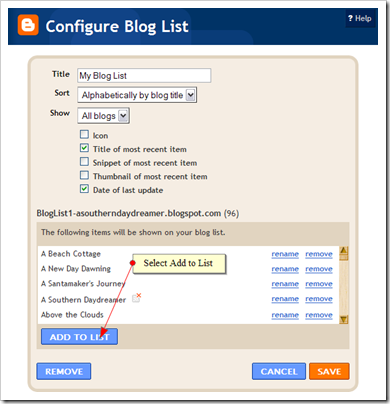
Okay so I am going to edit…. I see some of my blogs I am following but I want to add the others… so I select “Add to the list”

and I see as an option “Blogs I am following”… that is what I want! (There is also add by URL and import from Google Reader)…..

When I selected”Blogs I am Following”, up popped a list of all the “missing” blogs! All I had to do was select boxes for each blog and select “Save”…. and now all the blogs I am following are on my blog page!
Okay, so many of you may have already known this…but I bet a few of you didn’t! A new year is around the corner…go clean up your blog list! All kinds of configurations are available…….. you can sort them a few ways, and you can select which way they are shown (icon, most recent title, snippet of most recent, date of last update). I went with a simple list since I have so many, but there are many options! [Note: DON’T FORGET TO HIT SAVE!]
Just a little tidbit I thought I would share…… I will probably share things like this from time to time as I discover them…. perhaps they will be of help to some!


 Posts
Posts